
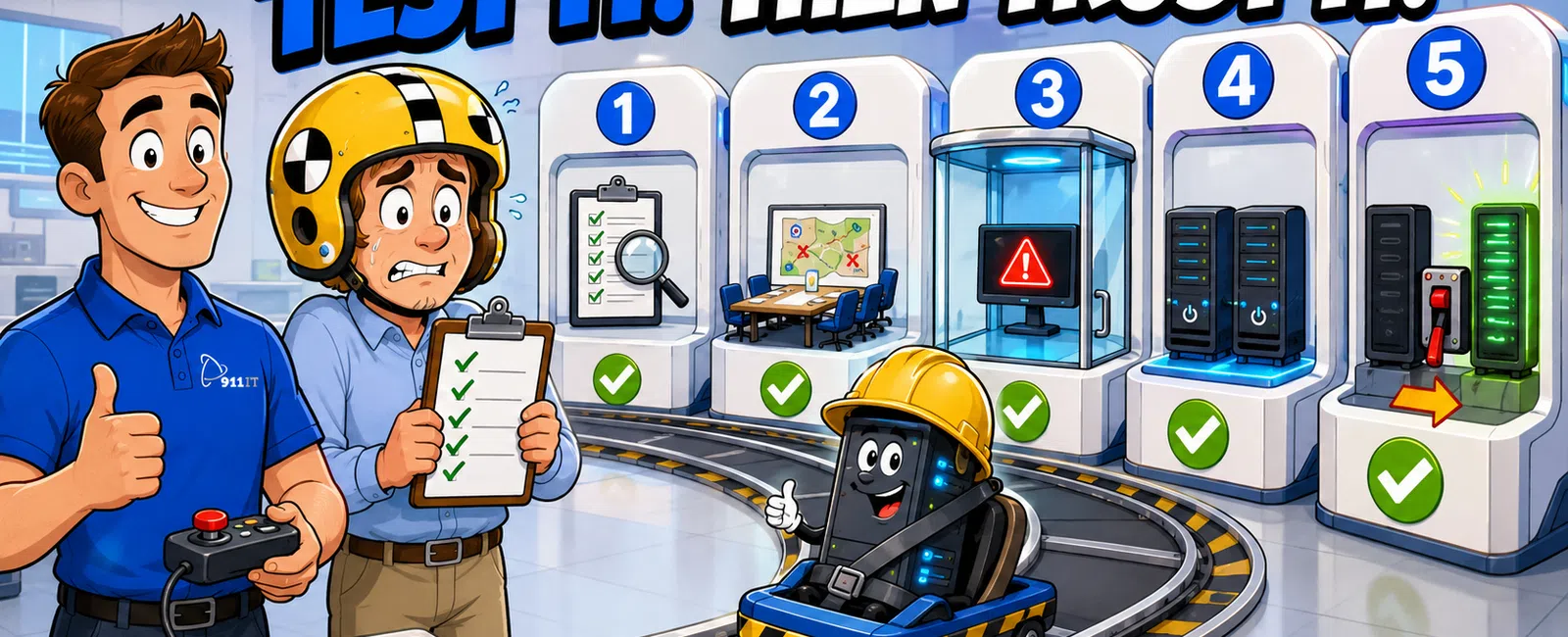
The five disaster recovery plan testing types are walkthrough testing (theoretical review), simulation testing (scenario-based exercises), parallel testing (running backup systems alongside production), cutover testing (switching to backup systems without shutting down production), and full interruption testing (complete failover with production shutdown). Engineering firms that test quarterly experience 67% faster recovery times than those who test annually or never, validating everything from documentation accuracy to actual system performance under real-world conditions.
Why Does Testing Your Disaster Recovery Plan Matter for Engineering Firms
Engineering firms handle massive CAD files, BIM models, and project deliverables that represent months of billable work. A single day of downtime during a critical project deadline can cost tens of thousands in delayed deliverables and client penalties.
Testing reveals the gaps between documented procedures and actual execution. Your team might know where backups live, but can they restore a corrupted Revit file at 2 AM when a project is due at 8 AM? Can remote engineers access workstations if your primary network fails during a multi-state infrastructure project?
Salt Lake City engineering firms face unique challenges with distributed project sites across Utah, Wyoming, and Arizona. A disaster recovery plan that works for a single-office operation fails when your team needs simultaneous access to engineering files from Casper job sites and Phoenix design centers.
Engineering firms that test their disaster recovery plans quarterly experience 67% faster recovery times than those who test annually or never.
Testing also satisfies client requirements and insurance obligations. Many government contracts and large commercial projects now require documented disaster recovery capabilities with regular testing evidence.
What Is Walkthrough Testing and When Should You Use It
Walkthrough testing is the least disruptive method where your team reviews disaster recovery documentation step-by-step without actually executing procedures. IT staff, key engineers, and project managers gather to discuss each recovery step, identify unclear instructions, and verify contact lists.
This method works best for new disaster recovery plans or after significant infrastructure changes. When your firm upgrades from on-premise servers to cloud services, a walkthrough ensures everyone understands the new recovery procedures before an actual emergency.
Walkthroughs cost nothing beyond staff time and catch obvious documentation gaps. You'll discover outdated vendor phone numbers, missing credentials for backup systems, and confusion about who authorizes system switches.
The limitation is clear: walkthrough testing validates documentation, not actual system performance.
Schedule walkthroughs quarterly and after any major IT change.
How Does Simulation Testing Validate Your Team's Response
Simulation testing introduces realistic disaster scenarios without affecting production systems. Your IT team responds to a simulated ransomware attack, building fire, or network failure while normal operations continue.
For engineering firms, effective simulations mirror actual risks. Scenario one: your primary file server crashes during a submittal deadline. Who contacts the client? How quickly can your team access yesterday's backups? Scenario two: a construction site project manager reports they can't access BIM files from the field.
Simulations reveal human factors that documentation can't capture. Engineers panic when they can't find files. Project managers bypass IT and create workarounds that compromise data integrity.
Run simulations during business hours but choose low-stakes periods - never during major project milestones. Debrief immediately after to capture fresh observations about what worked and what failed.
Simulations build muscle memory for your team without risking actual project data or client deliverables.
What Makes Parallel Testing Different From Other Methods
Parallel testing runs your backup systems simultaneously with production systems, processing the same data and transactions without switching user traffic. This method proves your backup infrastructure can handle real workload volumes and data synchronization without disrupting daily operations.
Engineering firms benefit because parallel testing validates performance with actual file sizes. Your backup might handle small test files perfectly but choke when restoring a 15 GB Revit model with linked AutoCAD references.
The process requires careful monitoring. Your IT team compares outputs from production and backup systems to verify data consistency. Do both systems show identical file versions? Can engineers open and edit CAD files from the backup server with the same performance as production?
Parallel testing catches synchronization issues before they matter. One mechanical engineering firm discovered their backup system was 18 hours behind production because overnight sync jobs were timing out on large rendering files.
This method requires duplicate infrastructure, making it more expensive than walkthroughs or simulations. For firms handling critical project data, the confidence gained justifies the investment.
When Should You Perform Cutover Testing
Cutover testing switches operations to your backup systems while keeping production systems running as a safety net. Users work from backup infrastructure for a defined period - typically several hours - while IT monitors performance and identifies issues.
This method tests the complete user experience. Can engineers actually work from backup workstations? Does VoIP phone service maintain call quality through backup network paths? Can project managers access document management systems with acceptable performance?
Schedule cutover tests during low-impact periods like Friday afternoons or between major project phases. Notify your team in advance so they can save work and prepare for potential disruptions.
The real value emerges when users report issues IT didn't anticipate. Engineers might discover that backup workstations lack specific software plugins. Administrative staff might find that backup systems don't integrate with third-party project management tools.
Cutover testing also validates your recovery time objectives. If your disaster recovery plan promises four-hour recovery but cutover testing takes eight hours, you need to revise either your plan or your promises to clients.
What Are the Risks and Benefits of Full Interruption Testing
Full interruption testing shuts down production systems completely and forces your team to recover operations from backups alone. This is the only method that truly simulates a catastrophic failure - no safety net, no fallback option.
The stakes are real, which is why most firms avoid this method. If your backups fail during full interruption testing, your business is actually down until you recover. For engineering firms with active project deadlines, this risk feels unacceptable.
Successful full interruption testing requires extensive preparation. Complete walkthrough, simulation, and parallel testing first. Schedule tests during planned maintenance windows or between project phases. Have vendor support on standby.
One structural engineering firm schedules full interruption testing annually during their office closure between Christmas and New Year's. They shut down production systems on December 26th and spend three days validating complete recovery procedures.
Full interruption testing reveals issues no other method can catch. You'll discover that some applications require manual configuration after restoration. You'll find that certain network dependencies weren't documented.
The benefit is absolute confidence. After successful full interruption testing, you know your disaster recovery plan works because you've proven it under the most demanding conditions possible.
How Do Salt Lake City Engineering Firms Choose the Right Testing Approach
Most engineering firms need a layered testing strategy rather than relying on a single method. Start with quarterly walkthroughs to maintain documentation accuracy and team familiarity. Add semi-annual simulations to practice decision-making and communication protocols.
- Walkthrough Testing: Quarterly reviews of documentation and procedures with no system disruption
- Simulation Testing: Semi-annual scenario-based exercises that test team response without affecting production
- Parallel Testing: Annual validation that backup systems can handle real workload volumes
- Cutover Testing: Annual user experience testing with production systems as safety net
- Full Interruption Testing: Optional annual complete failover during planned downtime for maximum confidence
Cutover testing makes sense for firms with flexible project schedules who can afford brief disruptions. Full interruption testing suits firms with predictable slow periods or those subject to strict compliance requirements that mandate complete disaster recovery validation.
Salt Lake City's engineering sector faces specific considerations. Firms working on multi-state projects across Utah, Wyoming, and Arizona need disaster recovery plans that account for distributed teams and remote site access. Your testing should validate that a Casper-based project manager can access files if your Salt Lake City office loses power.
Budget constraints matter. Walkthrough and simulation testing cost only staff time. Parallel testing requires duplicate infrastructure. Full interruption testing demands vendor support and potential overtime costs.
When evaluating managed IT services providers, ask about their testing methodology. Some providers include quarterly disaster recovery testing as part of standard service. Others charge separately for each test type.
The right approach balances risk tolerance, budget, and operational constraints. Firms handling government contracts or critical infrastructure projects need more rigorous testing than those working on low-stakes commercial projects.
What Should Engineering Firms Look for in a Disaster Recovery Testing Partner
Engineering firms need IT providers who understand industry-specific requirements. Your disaster recovery plan must protect massive CAD and BIM files, maintain version control across distributed teams, and enable remote access to high-performance engineering workstations.
Look for providers with documented experience supporting engineering firms. Ask about their largest file restoration, their experience with Revit and AutoCAD environments, and their understanding of engineering project deadlines.
Testing methodology matters. Some providers run superficial tests that verify backups exist without validating restoration procedures or performance. Effective testing includes restoration time measurements, file integrity verification, and user acceptance validation.
In Salt Lake City's engineering IT market, several providers offer disaster recovery services. Executech, Wasatch I.T., Nexus IT Consultants, INTELITECHS, ProLink IT, and Qual IT all serve local engineering firms with varying approaches. Large enterprise-focused MSPs might offer sophisticated tools but often treat small and mid-size engineering firms as minor accounts in thousand-client portfolios, leading to slow response times and rotating support staff who don't understand your specific environment.
911 IT specializes in engineering firm IT support across Utah, Wyoming, and Arizona, with specific experience in CAD, BIM, and engineering software performance. Our disaster recovery testing includes validation of large file restoration, remote access functionality, and engineering application performance from backup systems.
Matthew, whose firm had lost years of project files when their hard drive failed, found that 911 IT recovered every bit of information in a couple of days after another local company had declared the data unrecoverable. That same recovery expertise applies to disaster recovery testing - we don't just document procedures, we prove they work with your actual engineering data.
Our business continuity services include quarterly testing as standard practice, not an optional add-on. We provide 24-7 support during actual disasters, ensuring your team has expert help regardless of when systems fail.
For engineering firms in Salt Lake City, South Jordan, and across the Intermountain West, choosing a disaster recovery partner means finding a provider who treats your firm as a known partner rather than ticket number 4,387. We're large enough to handle enterprise-grade disaster recovery infrastructure but small enough that your project managers have direct access to engineers who understand your specific environment.
Frequently Asked Questions
How often should engineering firms test their disaster recovery plans?
Engineering firms should conduct walkthrough testing quarterly, simulation testing semi-annually, and parallel or cutover testing annually at minimum. Firms handling government contracts or critical infrastructure projects may need more frequent testing to satisfy compliance requirements. Test immediately after any major infrastructure change, software upgrade, or personnel change affecting disaster recovery responsibilities. More frequent testing reduces recovery time and increases team confidence during actual disasters.
What is the difference between disaster recovery testing and backup verification?
Backup verification confirms that data copies exist and are complete, typically through automated checksum validation. Disaster recovery testing validates that you can actually restore operations from those backups, including system configuration, application functionality, user access, and performance under load. Engineering firms need both: backup verification runs automatically, while disaster recovery testing requires planned exercises with team participation to prove complete operational recovery capability.
Can you test disaster recovery without disrupting engineering projects?
Yes, walkthrough testing, simulation testing, and parallel testing all validate disaster recovery capabilities without affecting production systems or active projects. Cutover testing causes brief disruptions but maintains production systems as a safety net. Only full interruption testing requires complete production shutdown. Most engineering firms achieve comprehensive validation through walkthrough, simulation, and parallel testing scheduled during low-impact periods between major project milestones or during planned maintenance windows.
What should be included in a disaster recovery test report?
A comprehensive disaster recovery test report documents the test type and date, systems and data tested, recovery time achieved versus objectives, identified gaps or failures, team member performance, communication effectiveness, and specific remediation actions with assigned owners and deadlines. For engineering firms, include file restoration success rates, application performance metrics, remote access validation, and user feedback. The report should provide evidence for compliance audits and guide improvements before the next test cycle.
How much does disaster recovery testing cost for engineering firms?
Disaster recovery testing costs vary by method and provider. Walkthrough and simulation testing typically cost only internal staff time, approximately $1,000 to $3,000 in labor per test. Parallel and cutover testing may require $3,000 to $8,000 including infrastructure and vendor support. Full interruption testing can cost $8,000 to $15,000 for comprehensive validation. Many managed IT providers include quarterly testing in standard service agreements. Industry-average backup and disaster recovery services range from $10 to $30 per user monthly.


