
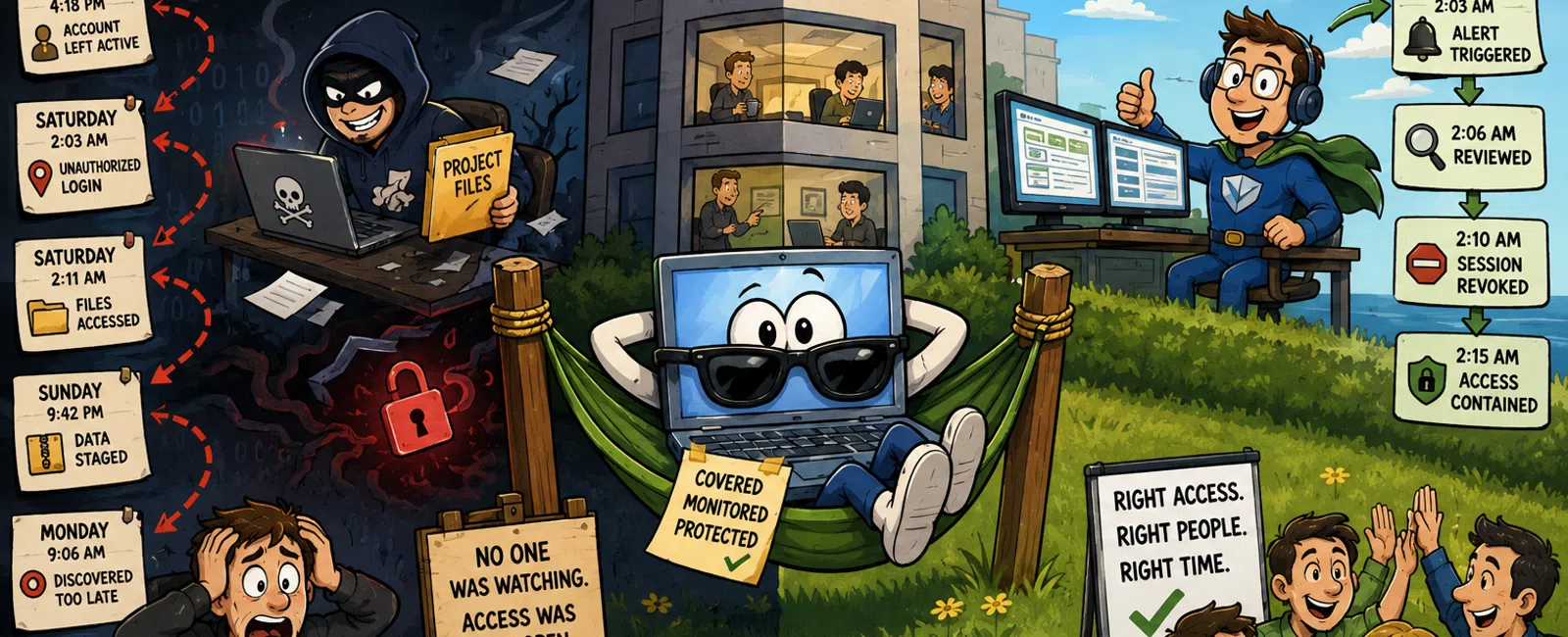
While You're Out of Office, Your Exposure Doesn't Pause
You can shut your laptop, lock the office, and step away for the weekend.
Your systems don't follow you.
Access stays active. Sessions persist. Vendor and contractor accounts
remain exactly as they were on Friday afternoon.
What changes is attention.
And in most 25-50 person firms, that attention drops to zero.
This is the most common operational gap we see in firms your size.
Not a lack of tools.
A lack of real coverage.
If no one is assigned to respond, the system is unmonitored by
definition.
What This Actually Looked Like Last Month
A 38-person engineering firm heading into a holiday weekend:
Friday, 4:18 PM
A vendor finishes a storage cleanup project. Account remains active.
Saturday, 2:03 AM
Vendor credentials log in from a new location.
Saturday, 2:11 AM
Large archive directories are accessed.
Sunday, 9:42 PM
Files are staged and compressed.
Monday, 9:06 AM
An engineer notices file inconsistencies and flags IT.
No one intervened.
Three days of exposure. Two days of response. Project timelines slipped.
External response costs followed.
Nothing failed visibly.
Access was simply available longer than it should have been.
A Second Pattern We See Just as Often
Same weekend. Different failure point.
Friday
An internal employee account remains logged in on a company-issued device.
Saturday night
Credentials are used from an unfamiliar device.
Sunday
Access expands across shared folders and project directories.
Monday
The issue surfaces through abnormal file access—not an alert.
Different starting point. Same outcome.
Unmonitored access turns into invisible activity.
The Timeline Most Firms Don't See
Uncontrolled Path
Friday: Access left open
Saturday: Unauthorized login
Sunday: Data movement
Monday: Discovery
Controlled Path
Saturday, 2:03 AM: Alert triggered
2:06 AM: Reviewed
2:10 AM: Session revoked
2:15 AM: Access contained
Most firms detect issues hours later, not minutes.
And those hours determine whether access spreads or is contained.
What Happens When This Is Caught vs Missed
Same scenario. Two outcomes.
Detected Within Minutes
Access is revoked immediately
Activity stops at initial login
No meaningful data movement
Response stays contained and targeted
Minimal operational disruption
Detected Monday Morning
Access persists for 48-72 hours
Multiple systems and files are touched
Investigation expands across the environment
External response costs increase
Operations are disrupted for days
Response time is the difference between containment and exposure.
What Real Response Looks Like in the First 15 Minutes
When coverage exists, this is what happens:
Alert triggers
Unusual login, time, or location
Notification is sent
To a named person—not a shared system
Initial check
IP address
Device recognition
User behavior history
Decision
Expected → document and close
Unexpected → terminate session immediately
Escalation
Access restricted
Recent activity reviewed
Scope defined
The goal is simple:
Contain before activity becomes access.
Most firms operate after this window—not within it.
What This Looks Like in Microsoft 365 (Execution-Level)
Where to look
Entra sign-in logs
What matters
Location: deviation from known geography
Device: unmanaged or unfamiliar endpoint
Risk state: flagged as anomalous
What risky sign-ins actually represent
Impossible travel (logins across distant regions in unrealistic timeframes)
Unfamiliar device usage tied to valid credentials
Sign-ins outside normal business behavior patterns
What combination requires immediate action
New location + unfamiliar device
Inactive account + after-hours login
Multiple rapid access attempts across systems
One signal may be noise.
Two signals together are a decision.
Why This Shows Up in Audits
This is not just a security issue. It is a governance issue.
When environments are reviewed, three things are evaluated:
Monitoring coverage
Is activity observed continuously or only during business hours
Response ownership
Is there a named individual responsible for action
Evidence of control
Can you demonstrate how alerts are reviewed and acted on
If the answer to any of these is unclear, it is documented as a control
gap.
Not because something failed.
Because no one can prove it wouldn't.
Weekend Exposure Control Protocol
Run this before any extended downtime.
Access Control
Export all user accounts
Identify vendor, contractor, and inactive users
Disable anything not required through the weekend
Confirm completion by name
Session Discipline
Enforce idle timeouts
Require device locking
Remove shared credentials entirely
Monitoring Coverage
Define who receives alerts
Define triggers: After-hours access
New locations
Privilege changes
Confirm alerts are reviewed in real time
Response Ownership
Assign a single accountable person
Ensure they understand: What matters
What to check
What action looks like
Pre-Weekend Verification
Access reviewed
Monitoring active
Ownership confirmed
If any step requires discussion, the gap already exists.
Controlled vs Uncontrolled Friday
Access
Weak: leftover and shared accounts
Controlled: only active, named users
Monitoring
Weak: alerts exist but sit unreviewed
Controlled: alerts reach someone immediately
Ownership
Weak: assumed
Controlled: assigned
Response
Weak: begins Monday
Controlled: begins immediately
This is not a tooling problem.
It is an accountability system.
2-Minute Reality Check
Answer these without hesitation:
Who receives alerts at 2:00 AM
When was your last completed access review
What was the last vendor account removed
If a login happens tonight from another state, who acts
If those answers are unclear, coverage is unclear.
What to Do This Week
Before Friday, export your full access list and remove anything that
should not stay active without supervision.
This single step eliminates the most common entry point for weekend
exposure.
The Quiet Reality
Most incidents don't start with something breaking.
They start with access that stays longer than it should.
Nothing looks wrong.
Until it already is.
What to Do Next
Schedule your 10 minute discovery call with 911 IT.
We will walk through exactly where your monitoring and response coverage stop.
You will leave knowing whether this risk applies to your environment.


