
Your Password Policy Isn't Broken. Your Access Model Is.
Let me slow this down for a minute.
You've already done what most brokerage owners do.
You told your team to use strong passwords.
You added rules. Complexity. Maybe expiration.
On paper, that looks responsible.
But that's not where this fails.
Because passwords don't fail on their own.
They fail when one login quietly reaches more than it should.
And in your business, that's where small problems turn into real ones.
What We See in Most Brokerages
This isn't theory. This is what shows up when we look under the hood.
- Agents reuse
their email password on outside tools
- CRM systems
aren't protected with multi-factor authentication
- Shared logins
still exist for "convenience"
- No one can
clearly map who has access to what
In most environments we review, at least one critical system is missing
multi-factor authentication.
And almost every time, we find shared credentials somewhere.
That's the pattern.
Not because people don't care.
Because the business moves fast—and access gets messy over time.
Where This Breaks
Here's how it actually plays out.
An agent reuses their email password on a third-party platform.
That platform gets breached.
Nothing looks wrong.
A few days later, someone logs into their email.
No alert. No disruption.
They sit quietly and wait.
Then a deal goes live.
They send one message.
Same tone. Same timing. Same context.
They change one detail.
That's all it takes.
Now this isn't about a password.
It's about trust being compromised in the middle of a transaction.
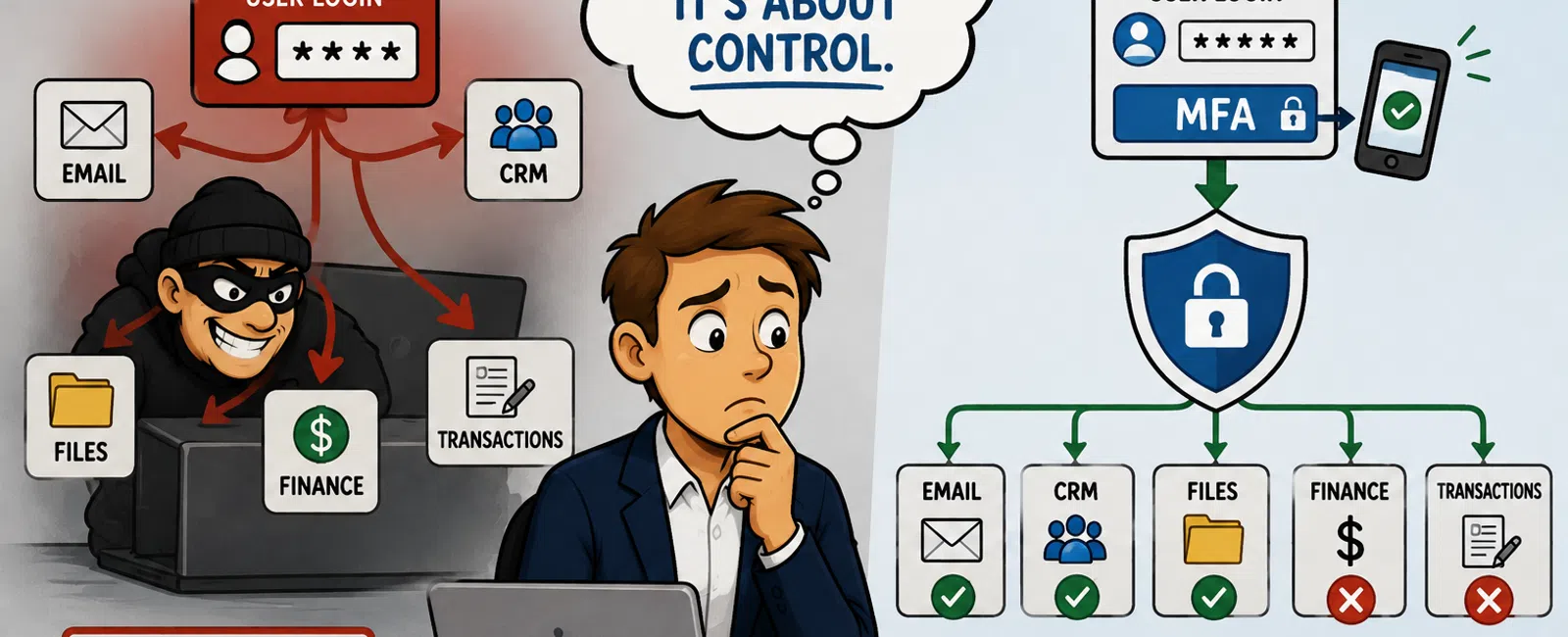
How Access Spreads (and How It Stops)
When access isn't controlled, it moves like this:
Credential → Email → CRM → Shared Files → Financial Systems
One login becomes full reach.
With proper controls, that chain breaks early:
Credential → Login attempt → Multi-factor required → Access blocked
Or
Credential → Limited system access → No reach into transactions or finance
That's the difference.
Not stronger passwords.
Containment.
What a Secure Brokerage Access Setup Actually Looks Like
A controlled environment isn't complicated. It's structured.
It includes:
- A
business-grade password vault that generates unique credentials
- No shared
logins—every user has their own access
- Multi-factor
authentication enforced across email, CRM, storage, and finance
- Role-based
access (agents, admin, accounting all separated)
- Centralized
login where possible
What This Looks Like in Practice
An agent logs into email.
- They enter
their password
- They confirm
through an authentication app
- They access
only agent-level systems
- They cannot
reach financial tools or admin controls
One login no longer opens everything.
That's the goal.
What This Is Built On
This isn't theoretical.
It typically runs on:
- A business
password vault system for credential control
- Multi-factor
authentication through platforms like Microsoft 365 or Google Workspace
- Optional
centralized login to simplify access without expanding risk
Nothing exotic.
Just properly implemented.
What This Looked Like Inside a Brokerage (Before & After)
Before
- Passwords
reused across systems
- No multi-factor
on CRM
- Shared logins
for transactions
- One compromised
account could access everything
After
- Password vault
implemented across all users
- Multi-factor
enforced on all critical systems
- Access
separated by role
- Shared
credentials eliminated
Result
One login no longer reaches financial systems or transactions.
That's containment.
Access Control Audit (Score Your Setup)
Password Management
0 = reused or stored informally
1 = mostly unique but unmanaged
2 = fully managed in a password vault
Multi-Factor Authentication
0 = not enabled
1 = email only
2 = enforced across all critical systems
Access Structure
0 = shared logins
1 = inconsistent individual access
2 = role-based access
Containment
0 = one login reaches everything
1 = partial isolation
2 = systems separated
A score below 6 means one compromised login can still move across your
business.
Who Owns This Inside Your Brokerage
This only works if ownership is clear.
- Operations
manager → defines access structure
- IT partner →
enforces and maintains it
- Broker/owner →
accountable for risk
If no one clearly owns it, it doesn't get done.
How an External Reviewer Sees This
Insurance providers and auditors don't care about password strength.
They care about:
- Whether one
login can reach multiple systems
- Whether
multi-factor authentication is enforced everywhere
- Whether access
is controlled by role
- Whether a
breach can be contained quickly
If those answers aren't clear, your business looks exposed.
And that shows up during renewals, not after.
The Two Changes That Actually Fix This
Not ten things. Just two that hold.
- Implement a
managed password vault for the team
- Enforce
multi-factor authentication across your five critical systems
Then remove shared credentials.
That's where control starts.
What To Do Next Week
Keep this focused.
- Identify your
five critical systems
- Flag every
reused password
- Fix any
multi-factor gaps within 24 hours
- Eliminate
shared logins immediately
- Document access
for every system
If access isn't documented, treat it as uncontrolled.
Final Thought
This isn't about technology.
It's about keeping deals moving without something breaking underneath
them.
Because your real risk isn't a breach.
It's one mistake spreading into everything else.
And that's what keeps showing up.
Your Next Step
Schedule your 10 minute discovery call with 911 IT to confirm whether one
compromised login would spread across your systems or stay contained.
You'll leave with a clear answer on where access breaks—and where it holds.


