
Your Password Problem Isn't Security. It's Control
You've probably already tightened passwords.
Longer. More complex. Maybe even added MFA in a few places.
And yet—if someone asked you, right now:
"Can one compromised login access your project systems?"
You'd hesitate.
That hesitation is the real risk.
Because most architecture firms aren't failing on effort.
They're operating with a system that still assumes a single credential can
safely control everything.
It can't.
And when you're coordinating across firms, consultants, and
healthcare-adjacent projects, that gap doesn't just exist—it gets exposed under
pressure.
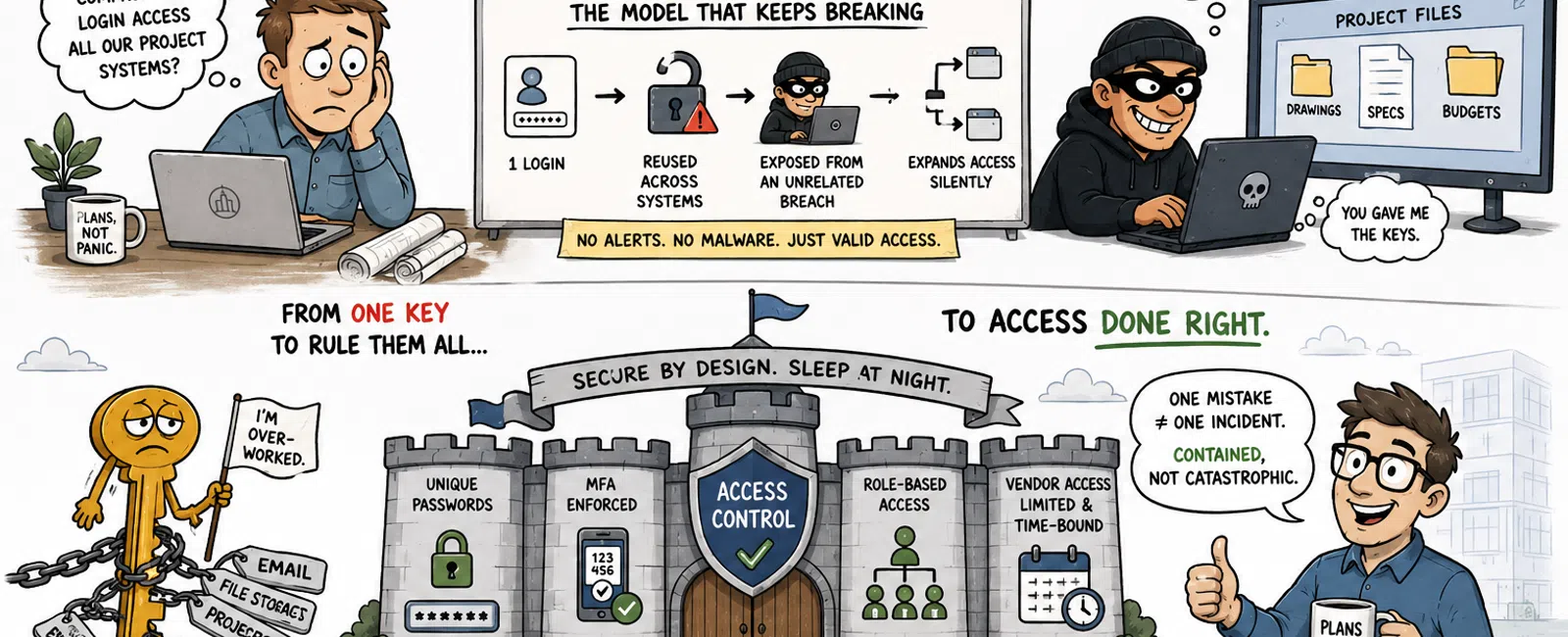
The Model That Keeps Breaking
Single Credential System
1 login
→ reused across systems
→ exposed from an unrelated breach
→ expands access silently
No alerts. No malware.
Just someone logging in exactly the way your system allows.
That's why this doesn't feel like a "cyberattack."
It feels like something you should have seen coming—after the fact.
What This Looks Like to Implement (Week 1-2)
This is where most firms stall—not awareness, but execution.
Week 1: Contain Entry Points
- Choose a
password manager:
- 1Password
- Bitwarden
- LastPass
- Roll out to
leadership and admins first
- Regenerate
passwords for:
- Email
- Admin accounts
- Project
platforms
Week 2: Lock Down Access
- Enforce MFA on
email (not optional)
- Expand MFA to:
- File storage
- Collaboration
systems
- Replace shared
logins with:
- Named user
accounts
- Role-based
access groups
What "Enforced" Actually Means
This is where credibility is won or lost.
- Users cannot
sign in unless MFA is enabled
- Policies block
access without MFA
- Legacy
authentication is disabled where possible
If someone can bypass it—even once—it's not enforced.
Where This Breaks First: External Access
This is the part most firms underestimate.
Not internal users.
Not admins.
External collaborators.
External Access Failure Points
- Temporary
vendor access that never gets removed
- Shared logins
across firms for convenience
- No visibility
into third-party security practices
- Old project
accounts still active post-completion
This is where clean internal systems unravel.
Because access isn't just about who you trust—it's about what they
connect to.
A Real Breakdown (How Access Actually Expands)
Healthcare-related architecture project. Multiple firms involved.
Step 1:
A consultant reuses a password from an unrelated breach.
Step 2:
Attacker logs into their email. No MFA.
Step 3:
They trigger password resets across project tools.
Step 4:
They inherit access to shared folders and documentation.
Step 5:
They send internal-looking emails requesting updated credentials.
No malicious software.
No alerts.
Just valid access expanding exactly the way the system allows.
What Failed
- Password reuse
created entry
- No MFA enabled
persistence
- Shared/vendor
access enabled expansion
What Would Have Stopped It
- Unique
passwords → breach contained
- MFA → login
blocked
- No shared
access → no lateral movement
This isn't theoretical.
It's a pattern.
What "Done Right" Actually Looks Like
This is your finish line.
A secure baseline looks like:
- 100% of users
on a password manager
- MFA enforced
across all critical systems
- No shared
credentials—anywhere
- Vendor access
tied to named accounts only
- Vendor access
removed immediately post-project
- Admin access
segmented and minimized
At that point:
One mistake ≠ one incident
It becomes contained instead of catastrophic.
Credibility Check (What We Actually See)
In most environments we assess:
- Password reuse
exists somewhere
- MFA is missing
or not enforced on at least one critical system
- External/vendor
access is loosely controlled
Often, it's more than one of these.
That's why "we've improved security" still doesn't feel like control.
Because it isn't—yet.
The External Lens You're Being Judged Through
When clients evaluate your firm—especially in healthcare or regulated
environments—they're not asking about password strength.
They're evaluating:
- Whether one
login can expose project data
- Whether access
is layered and enforced
- Whether your
system assumes human error—or protects against it
Modern frameworks expect layered controls like MFA, role-based access,
and enforced identity policies—not just strong credentials.
You feel this in client conversations.
Not as a checklist—but as pressure.
Day 30 Reality Check
After rollout, don't assume it worked.
Validate it.
Test These Directly
- Attempt login
without MFA → should be blocked
- Spot check 5
users → confirm MFA prompt
- Audit inactive
accounts → remove anything unused
- Check password
manager adoption → verify usage, not just deployment
Security that isn't tested drifts.
And drift is where incidents start.
What To Do Next Week
Don't audit your entire environment.
Start here:
Pick three systems:
- Email
- File storage
- Project
collaboration
Confirm:
- Every account
uses a unique password
- MFA is
enforced, not optional
If you're unsure on either—that's your gap.
And it's fixable quickly.
Schedule your 10 minute discovery call
Schedule your 10 minute discovery call to confirm whether password reuse,
missing enforcement, or vendor access is creating hidden exposure in your
environment. This is a fast way to see if these gaps actually apply to your
firm. 911 IT will walk through it with you and show exactly where risk could
expand.


